The latest feature! ‘CU POP BUS’

Something epic is finally here!!!🎉It’s the latest feature “CU POP BUS” that will make all Chula students’ lives much easier. 

📍Just open the CU NEX application and click the 🚌CU POP BUS icon to use.

Let me tell you that this is the only feature you’ll need! 

⭐️See the routes of all 5 CU POP BUS lines and where the stops are so you won’t accidentally get on the wrong one.

⭐️See where the bus is in real-time no matter where you are.

⭐️A map to show you all the facilities and CU POP BUS stops.

⭐️Click on the moving car icon to see the details like which line it is, the license plate, and even how crowded it is.

🚨If you cannot see or use this feature, it may be because the application is not updated to the latest version. So make sure to update the CU NEX application to use.👇🏻

📱Android version 

✅CU NEX STUDENT 1.60.29 

✅CU NEX STAFF 1.7.13  

📱iOS version

✅CU NEX STUDENT 1.82

✅CU NEX STAFF 1.91

That’s all! You can now use this new and amazing feature in the CU NEX application.🤩

#NEXKY #CUNEX #ฟีเจอร์ #รถป๊อป #CuPopBus #นิสิตจุฬา #การเดินทาง #เส้นทางรถ

ฟีเจอร์ใหม่! ‘CU POP BUS’

ความปังมาเยือนแล้ว!!! 🎉 เพราะฟีเจอร์ใหม่ล่าสุดอย่าง “CU POP BUS” จะมาช่วยอำนวยความสะดวกให้ชาวจุฬา ฯ วางแผนการเดินทางได้ง่ายมากขึ้นไปอีกก

📍เพียงแค่เปิดแอปฯ CU NEX และคลิกไปที่ไอคอน 🚌CU POP BUS ก็ใช้งานได้เลยย

บอกเลยว่า ครบ จบ ในฟีเจอร์ฯ เดียว! เพราะเขารวมความเด็ดมาให้ได้ไปใช้กันแบบฟิน ๆ

⭐️ดูเส้นทางของรถป๊อปทั้ง 5 สายได้ สายอะไรผ่านที่ไหนบ้าง ไม่พลาดชัวร์

⭐️บอกตำแหน่งของรถ แบบ real time สุด ๆ ไม่ว่าอยู่ที่ไหนก็ดูได้ 

⭐️แสดงแผนที่สถานที่ต่าง ๆ และจุดรอรถป๊อป สะดวกมากก

⭐️คลิกที่ตัวรถที่วิ่งอยู่ เพื่อแสดงรายละเอียดรถ เช่น สายรถ ทะเบียนรถ ความหนาแน่น

🚨หากใครยังไม่เห็นฟีเจอร์นี้ อย่าลืมไปอัปเดตแอปฯ CU NEX ก่อนน้า โดยเพื่อน ๆ สามารถเช็ก version ล่าสุดของแอปฯ ได้ตรงนี้เลยย👇🏻

📱Android version 

✅CU NEX STUDENT 1.60.29 

✅CU NEX STAFF 1.7.13  

📱iOS version

✅CU NEX STUDENT 1.82

✅CU NEX STAFF 1.91

เพียงเท่านี้ ก็เตรียมตัวไปใช้ 🤩ฟีเจอร์เริ่ด ๆ ที่รอทุกคนอยู่อีกเพียบ ได้ที่แอปฯ CU NEX เลยย

#NEXKY #CUNEX #ฟีเจอร์ #รถป๊อป #CuPopBus #นิสิตจุฬา #การเดินทาง #เส้นทางรถ
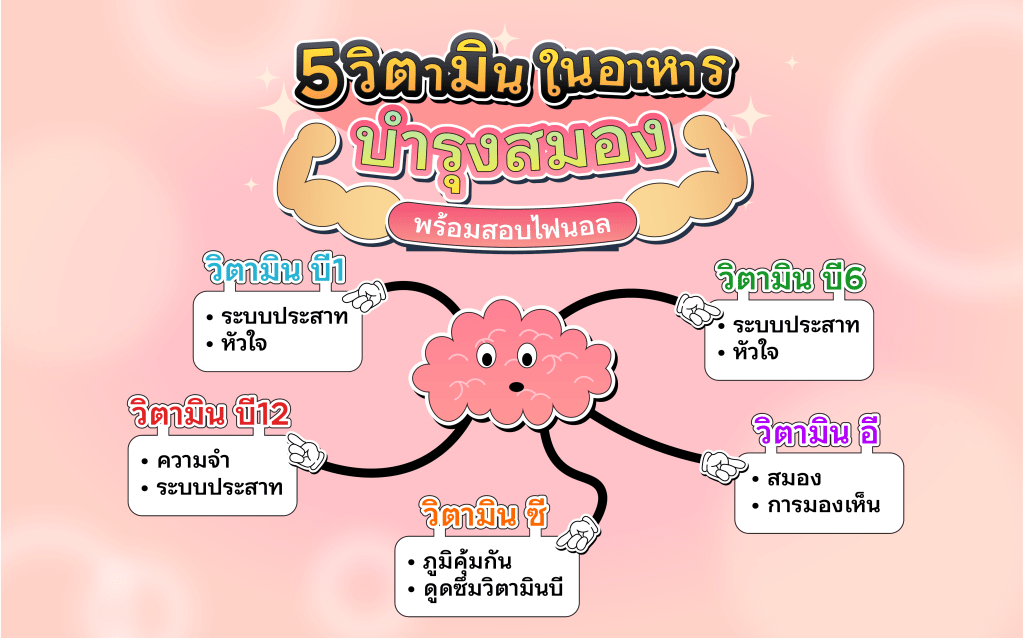
5 Vitamins that help your brain working better

🙌🏻 Hello CU peeps 🩷 Final exams are approaching. NEXKY will recommend you vitamins that help your brain working better. 🔥 What will they be and where you can get them? Let’s have a look. 👉🏻

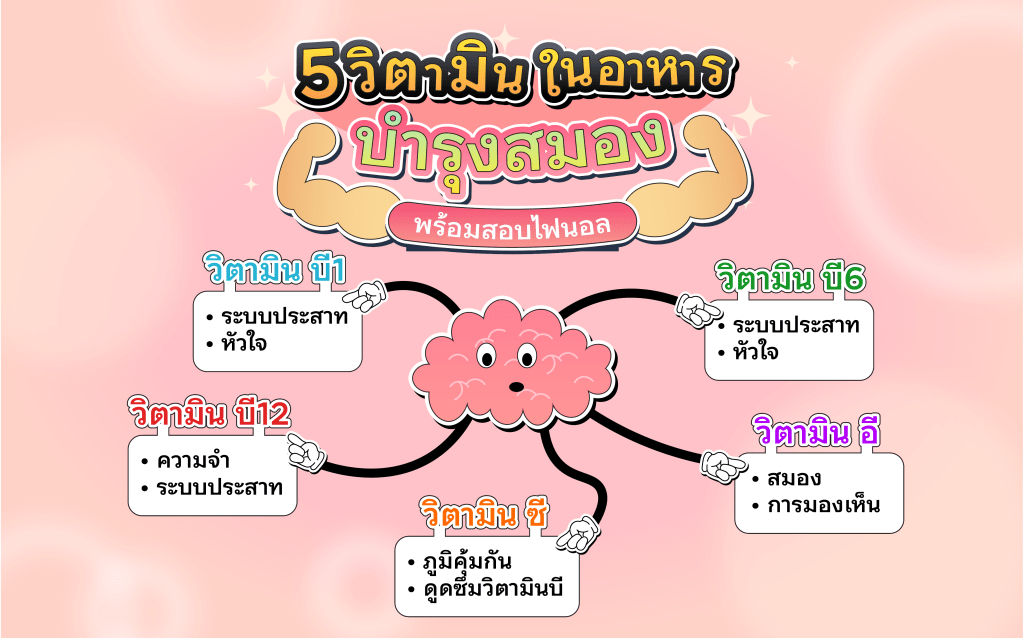
💊Vitamin B1 is good for your nerve and heart system. Human bodies keep vitamin B1 within muscles, brains and hearts. 

👀Source : Meat, Sunflower Seeds, Brown Rice

💊Vitamin B6 produce 2 important chemicals for your nerves which are Serotonin, it is significant to brain and nerve systems, and Norepinephrine, which helps with the function of the coronary muscles and control blood pressure.

👀Source : Eggs, Fish, Potato, Bananas, Nutsไข่ไก่ ปลา มันฝรั่ง กล้วย ถั่วต่างๆ

💊Vitamin B12 is good for brain memory and reduce risk of Alzheimer. 

👀Source : Meat, Fish, Eggs, Milk 

💊Vitamin E helps preventing free radicals, maintain brain, eye functions and is good for your skin cells. 

👀Source : Tomatoes, Spinach, Mangoes, Pumpkins 

💊Vitamin C is the most used one for body maintenance, prevents free radicals, enhance immunity system, improve body absorption and reduce severity of some virus. 

👀Source : Sour fruits

Source : https://www.bedee.com/articles/wellness/food-for-brain

#NEXKY #CUNEX #CU #วิตามิน #อาหารเสริม #สอบไฟนอล #เตรียมสอบ #วิตามินบี1 #วิตามินบี6 #วิตามินบี12 #วิตามินอี #วิตามินซี 

5 วิตามินในอาหาร ช่วยบำรุงสมอง พร้อมสอบไฟนอล

🙌🏻 สวัสดีชาวจุฬาฯ ทุกคน🩷 จะสอบไฟนอลแล้ววว น้อง NEXKY รวมวิตามินบำรุงสมอง พร้อมสู้กับไฟนอลไปด้วยกัน🔥 จะมีวิตามินอะไรบ้าง และแต่ละวิตามินมาจากไหนบ้าง ตามน้อง NEXKY มาได้เลยยยย👉🏻

💊วิตามินบี 1 ช่วยในการดูแลระบบประสาท และการทำงานของระบบหัวใจ ร่างกายของเราจะสะสมวิตามินบี 1 ไว้ตามกล้ามเนื้อ สมอง และหัวใจ 

👀พบได้ใน : เนื้อสัตว์ เมล็ดทานตะวัน ข้าวกล้อง

💊วิตามินบี 6 ทำหน้าที่เกี่ยวกับการผลิตสารสื่อประสาท 2 ชนิดที่สำคัญต่อการทำงานของร่างกาย ได้แก่ สารเซโรโทนิน (Serotonin) ซึ่งเป็นสารเคมีที่จำเป็นต่อสมองและระบบประสาท มีส่วนสำคัญในกระบวนการคิด พฤติกรรม และอารมณ์ และสารนอร์อิพิเนฟริน (Norepinephrine) ซึ่งทำหน้าที่กระตุ้นการทำงานของกล้ามเนื้อหลอดเลือดหัวใจและควบคุมความดันโลหิต

👀พบได้ใน : ไข่ไก่ ปลา มันฝรั่ง กล้วย ถั่วต่าง ๆ

💊วิตามินบี 12 เป็นอาหารบำรุงสมอง ความจำ ช่วยในการทำงานของระบบประสาทอีกตัวหนึ่งที่ช่วยลดความเสี่ยงในการเกิดโรคอัลไซเมอร์ 

👀พบได้ใน : เนื้อสัตว์ ปลา ไข่ นม 

💊วิตามินอี ช่วยต้านอนุมูลอิสระ บำรุงสมอง ดวงตา ผิงหนัง และเซลล์ในร่างกาย 

👀พบได้ใน : มะเขือเทศ ผักโขม มะม่วง ฟักทอง 

💊วิตามินซี เป็นหนึ่งในวิตามินที่นิยมใช้เพื่อบำรุงร่างกาย ต้านอนุมูลอิสระ เสริมสร้างภูมิคุ้มกัน เพิ่มการดูดซึมธาตุเหล็ก และลดความรุนแรงของการติดเชื้อไวรัสบางชนิด 

👀พบได้ใน : ผลไม้รสเปรี้ยวต่าง ๆ

ที่มา : https://www.bedee.com/articles/wellness/food-for-brain

#NEXKY #CUNEX #CU #วิตามิน #อาหารเสริม #สอบไฟนอล #เตรียมสอบ #วิตามินบี1 #วิตามินบี6 #วิตามินบี12 #วิตามินอี #วิตามินซี 

How to book Study Rooms through the CU NEX Application

📍Book Study Rooms at Office of Academic Resources (Central Library), Chulalongkorn University easily through the CUNEX Application.

Hello Chulalongkorn University community! Today, NEXKY is here to teach you how to book central rooms at Chulalongkorn University through the CU NEX application. Easy booking, convenient, anytime, anywhere. You can view and follow the steps easily. 🙌🏻

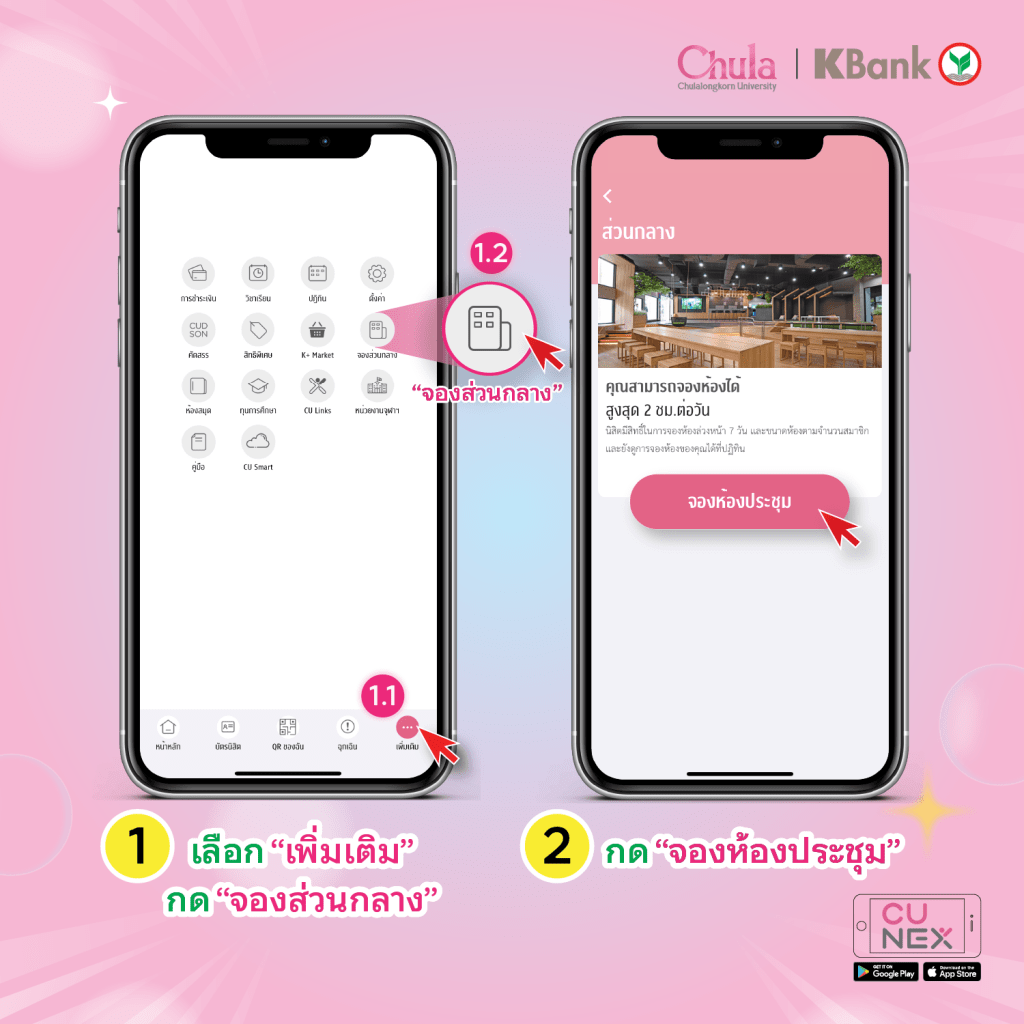
  1. Open the CU NEX application.
  2. Click on “More.”
  3. Click on “Book Rooms.”
  4. Click on “Book Meeting Rooms.”
  5. Enter your name, number of participants, and facilities required.
  6. Choose the venue, date, and time for the booking.
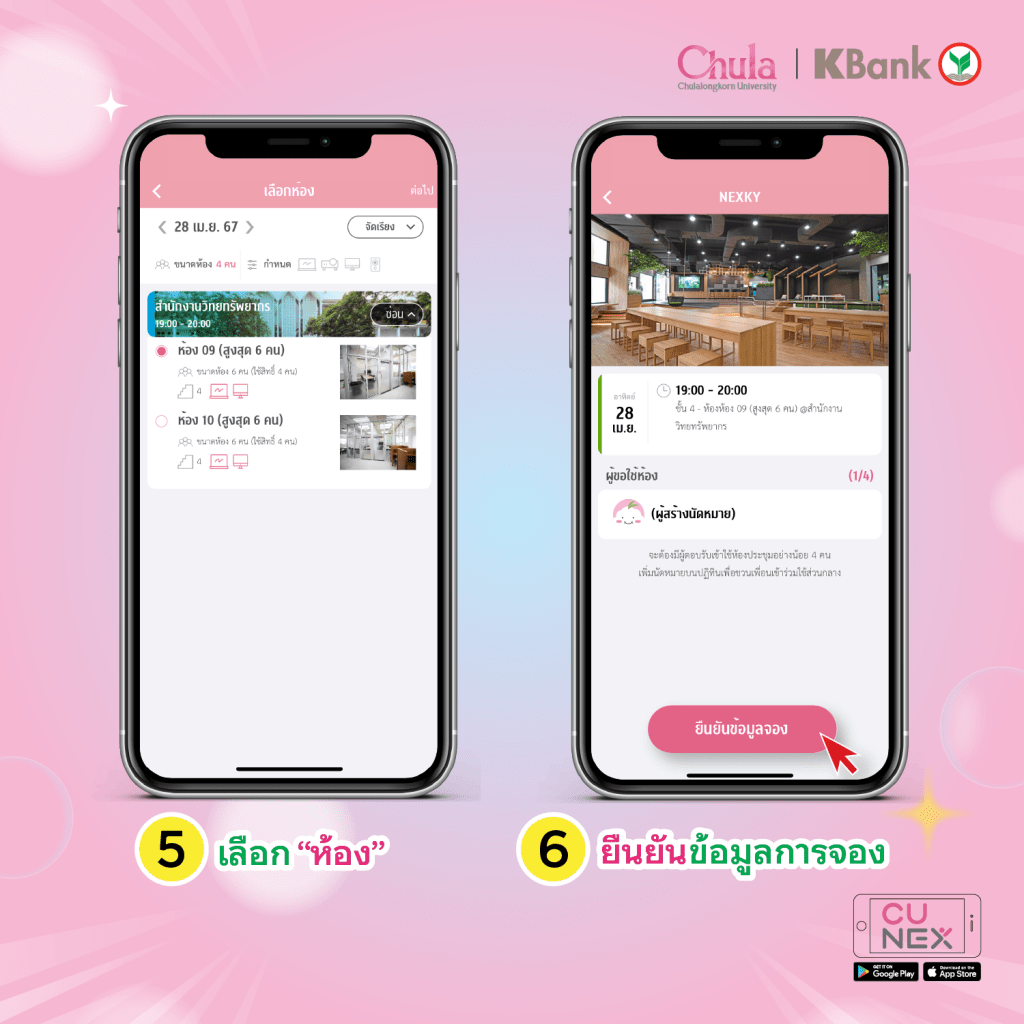
  7. Select the room.
  8. Confirm the booking details.
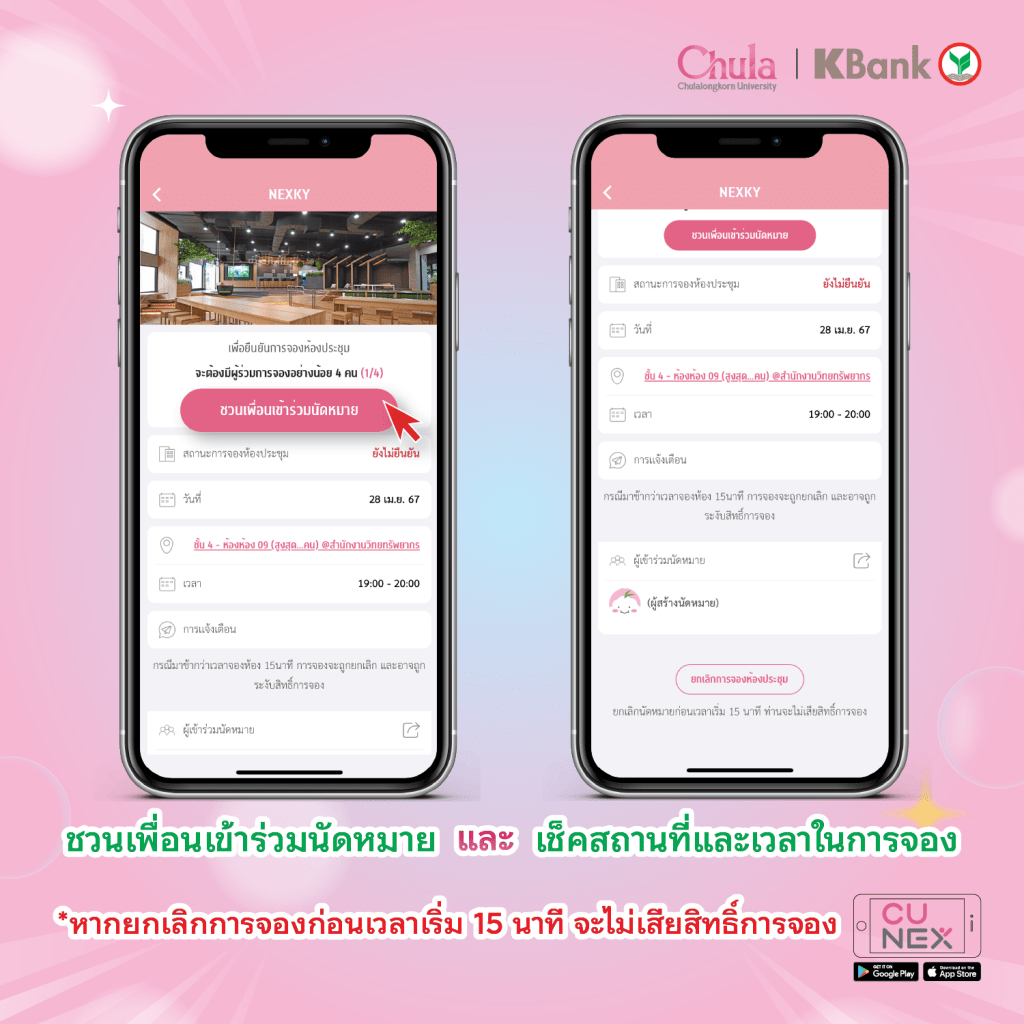
  9. Invite friends to join the appointment and check the location and time of the booking.

Note: Canceling appointments before 15 minutes prior to the start time will not result in a loss of booking rights. If you arrive later than 15 minutes after the booking time, the booking may be canceled and booking privileges suspended.

#NEXKY #CUNEX #CU #จองห้องส่วนกลาง #จุฬา #ส่วนกลาง #Coworkingspace #ห้องสมุด

วิธีจองห้องส่วนกลางผ่านแอป CU NEX

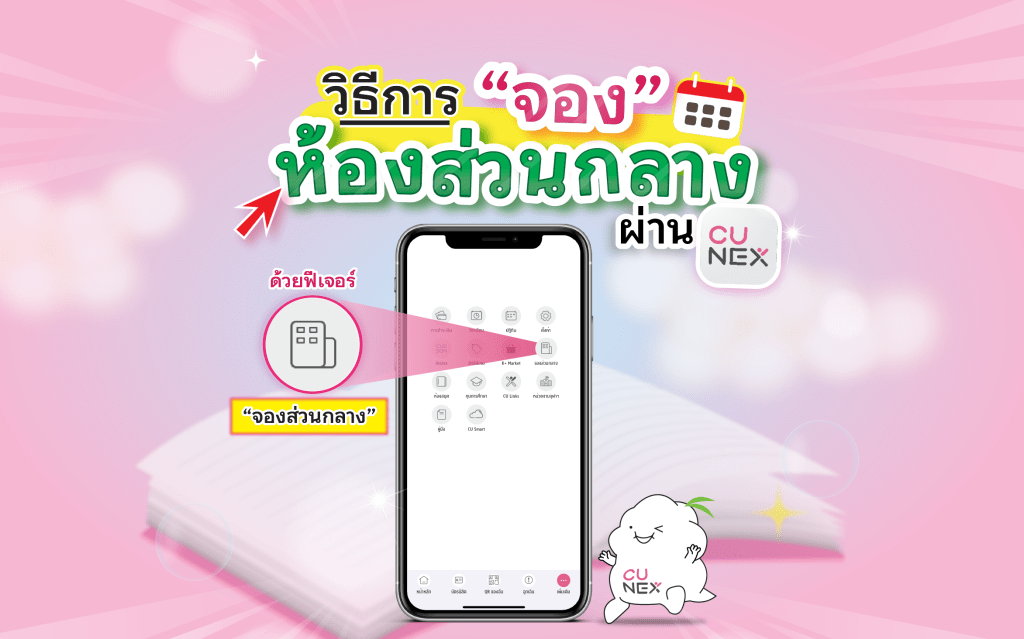
📍จองห้องส่วนกลางในจุฬาฯ ง่าย ๆ ผ่าน CU NEX Application 

สวัสดีชาวจุฬาฯทุกคน🩷 วันนี้น้อง NEXKY จะมาสอนวิธีการจองห้องส่วนกลางในจุฬาฯ ผ่านแอปพลิเคชัน CU NEX จองง่าย สะดวก ทุกที่ทุกเวลา สามารถดูและทำตามได้เลยยย🙌🏻

1. เปิดแอปพลิเคชัน CU NEX

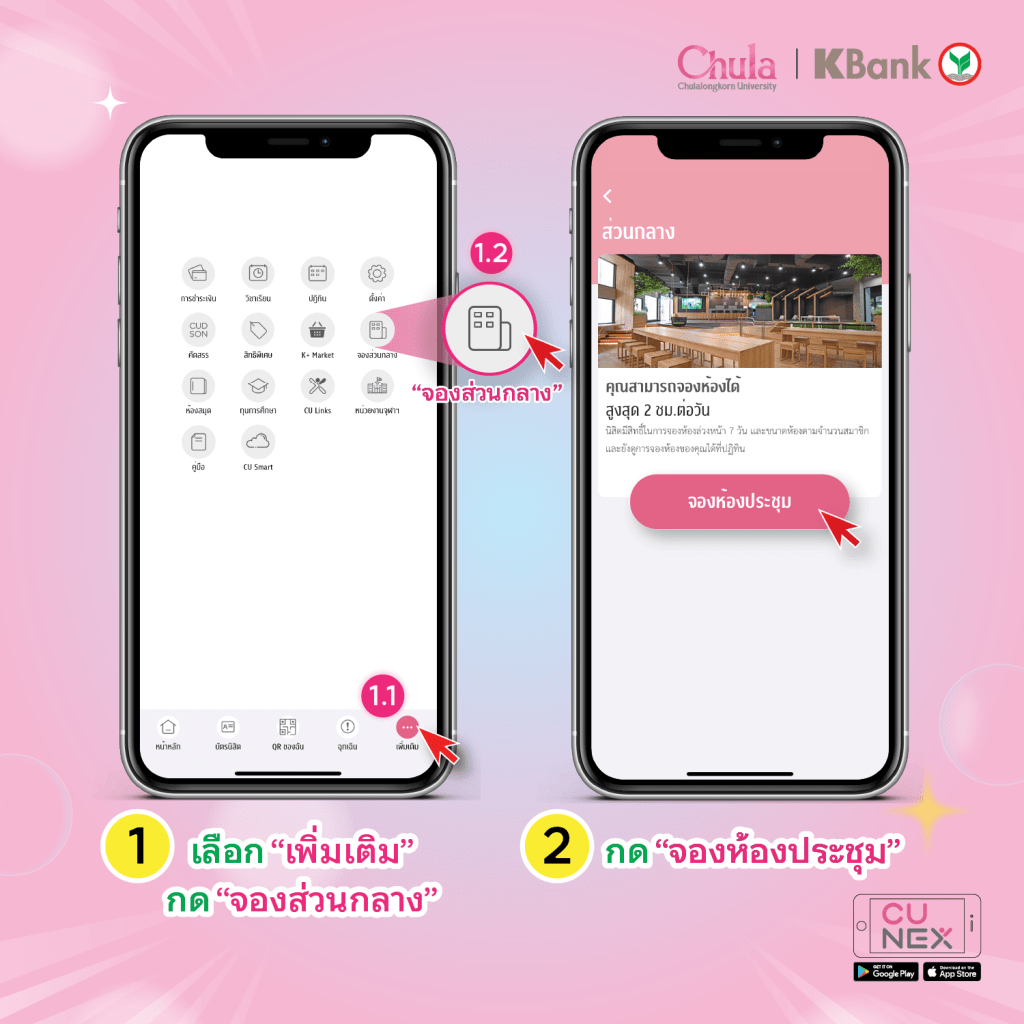
2. กด “เพิ่มเติม”

3. กด “จองส่วนกลาง”

4. กด “จองห้องประชุม”

5. กรอกชื่อ จำนวนผู้เข้าใช้งาน และสิ่งอำนวยความสะดวก

6. เลือกสถานที่ และ วัน เวลาเข้าใช้งาน

7. เลือกห้อง

8. ยืนยันข้อมูลการจอง

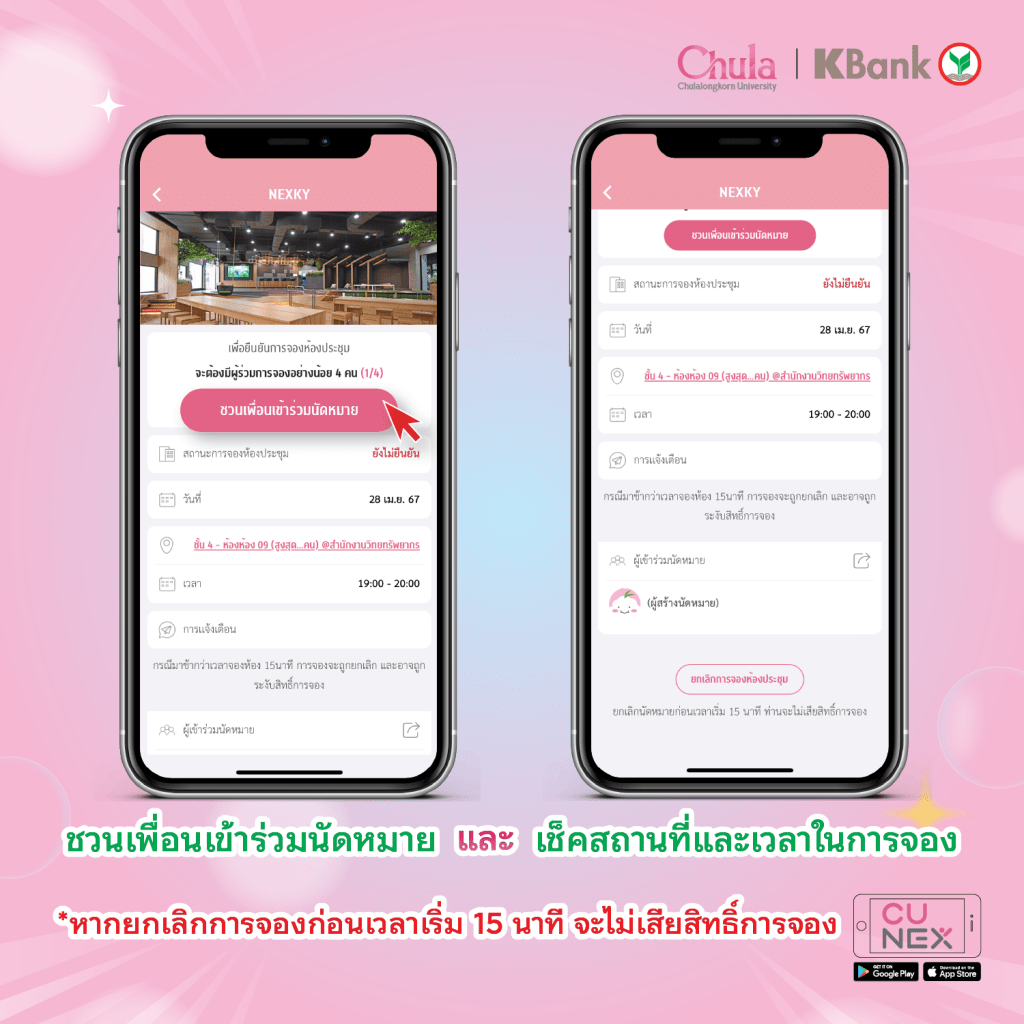
9. ชวนเพื่อนเข้าร่วมนัดหมาย และ เช็คสถานที่และเวลาในการจอง

หมายเหตุ : ยกเลิกนัดหมายก่อนเวลาเริ่ม 15 นาทีท่านจะไม่เสียสิทธิ์การจอง กรณีมาช้ากว่าการจองห้อง 15 นาที การจองจะถูกยกเลิกและอาจถูกระงับสิทธิ์การจอง

#NEXKY #CUNEX #CU #จองห้องส่วนกลาง #จุฬา #ส่วนกลาง #Coworkingspace #ห้องสมุด

An effective note-taking technique during exams with the Cornell method

As the exam season approaches once again, let’s explore an effective note-taking technique during exams with the Cornell method. ✍🏻✨

The Cornell note-taking technique involves brief note-taking by dividing the paper into 3 sections: Content, Keywords/Questions, and Summary. This allows all the content on a particular topic to be consolidated on a single page. This method was devised by Walter Pauk, the head of the Cornell University Learning Center and the author of the best-selling book ‘How to Study in College’. 📚

Implementing the Cornell method is simple. Start by dividing the paper into 3 main sections, with the largest space in the middle dedicated to writing the content of the topic. Then, divide each section of the paper as follows:

📝 Top Section: Write down the topic headings.

📝 Left Column: Use it to write down important Keywords related to that topic and points that are not yet clear to seek further information. This facilitates quick recall when revisiting the notes.

📝 Right Column: Use it to write down all the content. It should be detailed yet concise, and after understanding a portion of the content, you can use symbols or highlight to aid memory or emphasize important points.

📝 Bottom Section: Use it to write a summary of the key points in the topic. This helps summarize our understanding, making it convenient and time-saving for future review.

The Cornell note-taking method helps summarize all the content on a single page, provides clear Keywords, saves time for later review, organizes content systematically, improves our ability to organize thoughts, provides concise details suitable for understanding the content, and can be used to summarize content for all subjects. So, let’s not forget to utilize this technique during this exam season. 📖🔥

#CU #CUNEX #จดสรุป #จดโน้ต #ทำสรุป #cornellnote #cornellnotes #cornellnotetaking #notetaking #lecture #studynote #study #exam

วิธีจดสรุปให้ปัง ประหยัดเวลาทบทวน แบบ Cornell Note

ฤดูกาลสอบไฟนอลกลับมาอีกครั้ง มาดูวิธีจดโน้ตช่วงสอบอย่างมีประสิทธิภาพด้วยเทคนิคการจดโน้ตแบบ Cornell กัน ✍🏻✨

เทคนิคการจดโน้ตแบบ Cornell คือ การจดโน้ตย่อ ๆ โดยแบ่งพื้นที่ในกระดาษออกเป็น 3 ส่วน ได้แก่ เนื้อหา Keyword ข้อสงสัยในเนื้อหา และสรุป ซึ่งจะทำให้เนื้อหาในประเด็นนั้น ๆ ทั้งหมดรวมอยู่ในหน้าเดียว ซึ่งวิธีนี้ถูกคิดค้นขึ้นโดย Walter Pauk หัวหน้าศูนย์การเรียนรู้ Cornell University ผู้เขียนหนังสือ Best Seller อย่าง ‘How to study in college’ 📚

การจดโน้ตแบบ Cornell สามารถทำได้ง่าย ๆ เริ่มต้นด้วยการแบ่งเนื้อที่ของกระดาษออกเป็น 3 ส่วนใหญ่ ๆ โดยให้พื้นที่ตรงกลางมากที่สุด เพื่อใช้ในการจดเนื้อหาของเรื่องนั้น ๆ ต่อมาจะเป็นการแบ่งพื้นที่แต่ละส่วนในกระดาษดังนี้

📝ส่วนบนสุด : เขียนหัวข้อเรื่องที่เราจด

📝ฝั่งซ้าย : ใช้เขียน Keyword ที่สำคัญเกี่ยวกับหัวข้อนั้น ๆ และประเด็นที่ยังไม่เข้าใจเพื่อเอาไปหาข้อมูลเพิ่มเติม ทำให้นึกย้อนได้เร็วขึ้นเมื่อกลับมาทบทวน

📝ฝั่งขวา : ใช้เขียนเนื้อหาทั้งหมด ควรเป็นเนื้อหาที่เป็นรายละเอียดโดยย่อ และผ่านการทำความเข้าใจมาส่วนหนึ่งแล้ว สามารถใช้สัญลักษณ์หรือไฮไลท์เป็นตัวช่วยจำ หรือเน้นความสำคัญเรื่องนั้น ๆ

📝ส่วนล่างสุด : ใช้เขียนสรุปเนื้อหาส่วนสำคัญในเรื่องนั้น เพื่อสรุปความเข้าใจของเราเอง ทำให้สะดวกและประหยัดเวลาในการกลับมาอ่านทบทวน

การจดโน้ตแบบ Cornell จะช่วยสรุปเนื้อหาทั้งหมดภายในหน้าเดียว มี Keyword ให้เห็นชัดเจน ประหยัดเวลาในการกลับมาอ่านทบทวนในภายหลัง ได้เรียบเรียงเนื้อหาอย่างเป็นระเบียบ ทำให้เราสามารถจัดระเบียบความคิดได้ดีขึ้น มีรายละเอียดโดยย่อ เหมาะกับการทำความเข้าใจเนื้อหา ทั้งยังสามารถนำมาใช้สรุปเนื้อหาได้กับทุกวิชา แล้วอย่าลืมนำเทคนิคนี้ไปใช้ในการจดสรุปช่วงสอบไฟนอลนี้กันนะ 📖🔥

#CU #CUNEX #จดสรุป #จดโน้ต #ทำสรุป #cornellnote #cornellnotes #cornellnotetaking #notetaking #lecture #studynote #study #exam

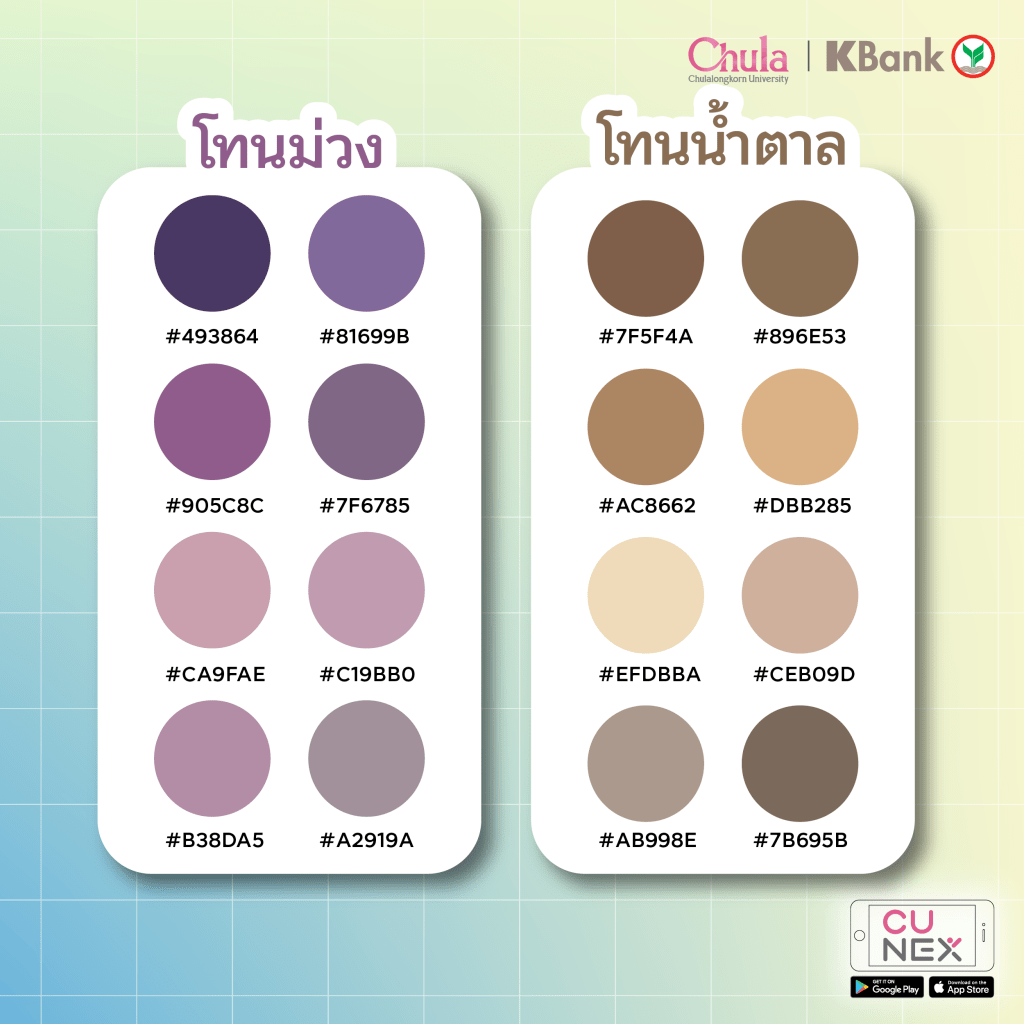
Goodnote Color Palette

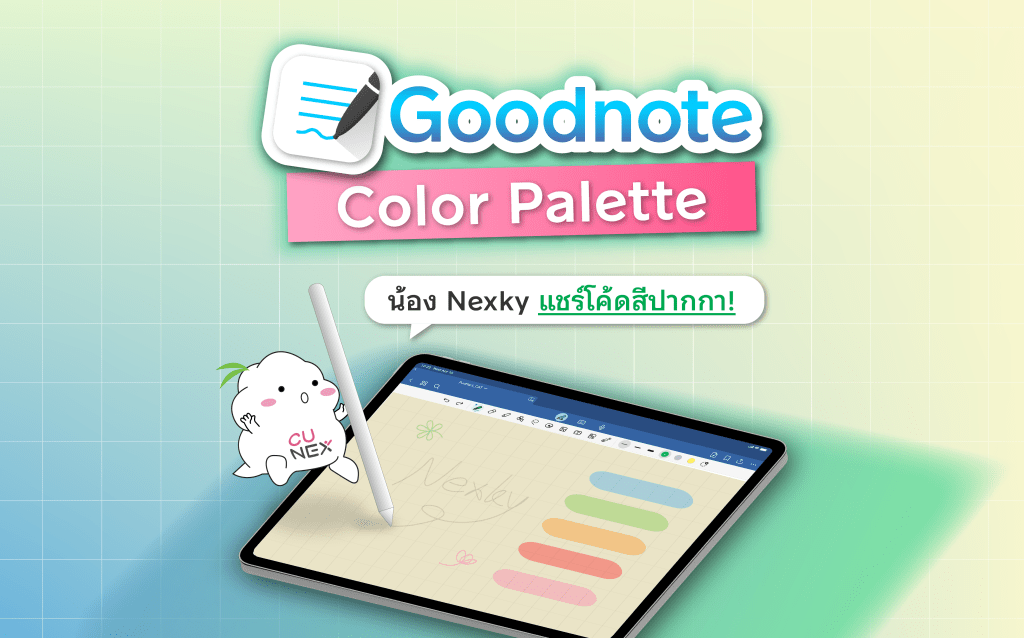
🎨 Don’t miss out! NEXKY is here to share marker color codes for the Goodnote app. Get your pastel tones now and save them quickly.

🙌🏻 Hello, everyone from Chulalongkorn University 🩷 Who’s into note-taking? ✍️ Today, NEXKY brings color codes for Goodnote app’s pastel tones to share with all of you. There are shades of blue, pink, yellow, green, purple, and brown. Check them out and save them for your use! 👉🏻

Source: https://s.lemon8-app.com/s/YRefdYmrQR

#NEXKY #CUNEX #CU #Goodnote #โค้ดสี #colorpalette #จดสรุป #studygram #แอปดีบอกต่อ #study #paint

Goodnote Color Palette

🎨 สายจดห้ามพลาด น้อง NEXKY มาแชร์โค้ดสีปากกา แอป Goodnote โทนมินิมอล รีบกดเซฟกันด่วนน🩷

🙌🏻 สวัสดีชาวจุฬาฯ ทุกคน🩷 ใครเป็นสายจดกันบ้าง✍️ วันนี้น้อง NEXKY เอาโค้ดสีมินิมอลแอป Goodnote มาแชร์ให้เพื่อน ๆ ทุกคนได้ใช้กัน มีทั้งโทนฟ้า ชมพู เหลือง เขียว ม่วง น้ำตาล จะมีสีอะไรบ้าง ตามมาดูและกดเซฟไปใช้กันได้เลยย👉🏻

ที่มา: https://s.lemon8-app.com/s/YRefdYmrQR

#NEXKY #CUNEX #CU #Goodnote #โค้ดสี #colorpalette #จดสรุป #studygram #แอปดีบอกต่อ #study #paint